Kamis, 23 Juni 2011

How to record a vendor refund in QuickBooks

I know I have another post similar to this one in the title only.  This is for when you have a vendor credit and then the vendor refunds the money.  How is this entered in QuickBooks?


Click on any photo to enlarge
Above is the vendor credit we have on our account.                                                             


Next go to banking, record deposit and enter the vendor refund check.  Use the vendor name in the transaction and accounts payable in the "from account" box.
Then go to vendor, pay bills and click on the "bill" that was created by the vendor deposit.

Apply the vendor credit memo to the "bill" created by the transaction above. This will result in a zero transaction (the deposit will clear the vendor credit).                    


This process will clear your vendor credit and record the deposit for you.                         
Lynda 
Check out my website www.artesanibookkeeping.com

Senin, 13 Juni 2011

Sorting columns in the bank reconciliation section of QuickBooks

Did you know you can sort any column while in the bank reconciliation screen of your QuickBooks program? 

Just click on the header of any of the columns and you can sort by whichever column you need to help you reconcile.  I like to sort by ref number when clearing checks.  Sometimes I find it easier to sort by amount when clearing debit transactions or deposits.

One warning, however, if you sort by the cleared column (the one with the check mark), if you click to look at a transaction, it will jump to cleared and will not open.  This freaked me out the first time I sorted by this column because I did it on an account with a large bank reconciliation and I could not find where my transaction jumped to.  So be careful when viewing by the cleared column.  Just view these transactions from there, do not click on them.

The following are some screenshots of how your transactions will look when you click on each header:

Click on any photo to enlarge
By payee

By Date

By Ref #


Lynda
Check out my website www.artesanibookkeeping.com

Senin, 06 Juni 2011

Data Base Fragments-How to keep your data file "happy"


Here are the housekeeping steps to keep the data base fragments low in your data file.  Open QuickBooks, hit F2 key and make note of the db fragments in the data file.  Now here is how we can reduce those fragments:

  • Resort the lists in your data file.  These lists include the customer list, vendor list, chart of accounts list.  To resort in 2011, just click the name tab header and it will resort them.   In the earlier versions, you click on the bottom left tab, and you will see a selection to resort.
  • Go to file, utilities, rebuild and rebuild the data file.  From time to time when you backup, you will get the message that the data could not be backed up and you must rebuild your data file.  Rebuilding at this point is just to keep the data file healthy.  But do not "over do" using the rebuild utility as it can actually cause more data file problems than help a data file.  Limit using rebuild to a few times each year.
  • Make a portable file.  This little tip has helped me fix client's data files so many times.  Go to file>save copy or backup>and select portable company file.  Save this file to your desktop.  Now restore the file to your file folder that holds your data files, but give it a different name like xyz company-new.  
Now open the newly restored portable.  Hit the F2 key.  Your  data base fragments should be less. Once you are satisfied with the new company file, delete the old one and change the name on the "new" file to your operating data file name.

If you still see more than 9 db fragments:
Go to Windows start button, programs, accessories, utilities and run the utility to reduce the data base fragments in your entire PC.

Lynda

Check out my website www.artesanibookkeeping.com

Rabu, 01 Juni 2011

I purchased QuickBooks 2011. How do I find my data-company file?


This is a question I see over and over on the forum.  If you know where you keep your company file,  just open QuickBooks 2011 and then go to file, open or restore company file and browse to the data file (.qbw) file.

But what if you do not remember where that file is?  You can do a Windows search for that file.   Click the bottom left windows icon (flying flag on my computer).  In the search box, type ".qbw".  This will bring up all files with that designation.
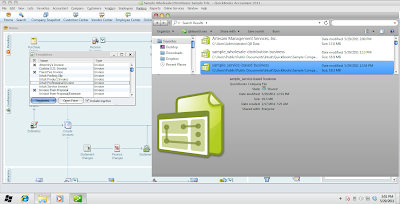
Click photo to enlarge


Now remember the path to that file.  Open QuickBooks and go to file, open or restore company file and then browse to your file.

You will see a warning that the file that you are about to open needs updating.  That is okay.  You want to update it to the newer format.  Next, it will run a backup of the 2008 file and then open in the new program in the new format.

Note:  You will no longer be able to open the file in QuickBooks 2008 once you have completed the update.

Once you have your program and file up and running, I highly recommend updating the program. Go to help, update QuickBooks.  This will get your program on the most current release, currently, R6.

You can also create a backup while in the 2008 program and then when you open QuickBooks 2011, just click file, open or restore company file, click restore.

Lynda
Check out my website www.artesanibookkeeping.com

Online banking, payroll and emailing won't work in QuickBooks 2008

Intuit has stopped some of the features the 2008 product as of May 31, 2011.  What does that mean for the QuickBooks 2008 user?

Here is a list of services that you will no longer be able to access in your program starting today:


This list is direct from Intuit's support pages.  The links are above to that site for the specific services that are discontinued.

Now, you can upgrade to the newest version (it is great!) and get your features back.  Here is a link to the site to purchase from Intuit.  They normally run sales of the program the first week of June right after the discontinuation of a product.  You can also try googling the product you want to purchase.   Sometimes you can get a better buy from Amazon.com or Best Buy or any other reputable seller.  And do not be afraid of downloading the product, as you can always re-download.  See this other post on the site for that. 

So you have downloaded the new program.  How do you open your data file from 2008 to the new program?  I will have this information on the next post!

Lynda
Check out my website www.artesanibookkeeping.com